Tools and Techniques for Musicians, Composers, and Tinkerers
Mic works with Samsung S4 and Lg Camera app
14 posts · 31885 views
by iowabucks » Sun Mar 22, 2015 22:21 UTC
Hey everyone,
I like videotaping a little bit at concerts, but hated the audio I got from the show. I was hesitant at first to try the BootlegMic because it said it may or may not work with Android phones. But for less than $10 I thought what the hey.
I have a basic knowledge of electronics and can solder so I gave it a try. Took less than an hour. Real easy. On my US Cellular Samsung S4 I had installed the LgCamera app in hopes that maybe it would give my videocamera a fixed focus. (Another low light concert problem). I haven't figured that out yet but at least this app's audio works with the BootlegMic where my stock videocamera app doesn't.
I have only tested it in my car with some good volume and a sub. It sounds like it should work great. But it does cut down on the volume a bit and was wondering if that would be most easily fixed in post? The distortion from the thumping bass is gone but I would want to raise the volume level in editing to bring it back to normal. I'm still trying to figure this out so if anyone has any ideas on the easiest way to do that, it would be great. My next concert is in another two days so I'm looking forward to testing it out. Then maybe tweaking the resistor for more or less gain. Can anyone tell me which direction I need to go with the resistor and how I will affect the audio?
Now another problem I have is not with the audio but the LgCamera app itself. I have 2 days till my next concert and this app looks far more extensive than the stock video app, but I cannot get a good quality video from it. Even set for the best possible resolution that the S4 can record in, it has crappy looking video. It is not set for 4k recording. The S4 cannot do that. I need to figure out why the recording quality is so bad. Other than that, the mic situation looks good, just need to tweak the mic and figure out the video and find a fixed focus.
Al in all the mic should work great for what I need it for, just need to work thru some kinks to get the "total video performance" up to par.
Thanks. Jerry.
by guest » Mon Mar 23, 2015 20:24 UTC
i dont know much about the camera or software, but if you want the mic to be louder, increase the value of the resistor. doubling the value should double the volume, etc.
by iowabucks » Tue Mar 24, 2015 05:45 UTC
Will doubling the value of the resistor, (making it louder), also take it back to being a little more distorted as it does with the stock phone mic?
I guess what I am asking is will changing the value make it louder but still get rid of the loud audio distortion, or go back closer to stock sound (with all the distortion).
If so, I'm guessing I need to find a happy medium somewhere in between?
I hope I am explaining that well enough.
Jerry.
by guest » Tue Mar 24, 2015 08:04 UTC
there are 3 places that the signal distorts: 1. the diaphragm of the microphone not moving linearly with applied sound pressure. 2. the internal microphone amplifier circuit (resistors included) not behaving linearly, or going beyond thier limits. 3. the internal phone amplifier not behaving linearly, or going beyond its limits.
with most phones, you get all 3 of these when trying to record something that is very loud. the phone tries to adjust its gain to limit #3, but it can only knock the gain down so much. so what the bootleg mic does, is knock the gain down before it goes into the phone, so you dont have problems with #3 anymore. it also changes the way the internal microphone amplifier is wired, to drastically reduce #2 (basically also reducing its gain). this just leaves #1, which there isnt much that can be done about, as its a physical property of the microphone. luckily this is the smallest of the distortions.
so, by increasing the resistor, you increase the signal going into the phone. this could start to cause distortion if the signal gets too big, but the internal gain control on the phone will limit this. so, the short answer is yes, it could cause distortion, but this wont happen gradually. it will be more of a hard cut-off thing. you could double the resistor value, and it would be fine, but going to 2.5x might make it distort. i would reccomend taking a test recording and see how it goes. you can then take a look at the peak signals in audacity or soundforge or some other software, and see what its like. if the peaks are down 10dB, its probably worth doubling the resistor. otherwise its probably better to play it safe and leave it where its at. you could also put a switch on it with 2 or 3 different resistors.
by iowabucks » Wed Mar 25, 2015 07:17 UTC
I definitely need to get more frequency response. While it did cut down on the distortion, the audio sounded pretty muffled. Almost no treble at all.
I will see what audacity or soundforge tells me but I will probably double the resister value on my next try.
Will I need to change out the cap too?
Thanks with your help with this so far.
by guest » Wed Mar 25, 2015 22:35 UTC
its possible that the lack of high-end is due to your cellphone. the micrphone in the bootlegmic is pretty good up to 30kHz. i measured an iphone input at one point, and i dont think it went past 12kHz. some of them are specifically tuned for voice, so it doesnt go above 6kHz or so. you should definitely check out the spectrum in audacity. you could either record a really loud white-noise, or do a frequency sweep into a speaker from your computer. the thing to look for, is how the high end drops off. if it cuts off very sharply past a certain frequency, then it is a digital filter happening, and that would be inside the phone. if it drops off softly, then it could be either the microphone or the phone. it might be possible to compensate for this with a capacitor strategically placed, but i will have to think about that.
the capacitor is there to set the low frequency attenuation point. ideally, this is below 20Hz or so, to keep the audio spectrum flat. if you up the resistor, this pushes the cutoff point down, which is probably fine as the phone will filter out the extra low frequencies. ideally you would half the capacitor when you double the resistor, keeping their product constant. if the capacitor is too small, the cutoff frequency moves up, and everything below that point gets boosts. so you can do a "bass boost" by moving the capacitor value up.
by iowabucks » Thu Mar 26, 2015 07:43 UTC
I thought I would post a link to the video for you to see for yourself. I'm sorry I still haven't had a chance to run it through one of those audio editing programs to see what they tell me.
https://www.youtube.com/watch?v=h575Qv5bBgw&feature=youtu.be Brit Floyd
This wasn't a terribly loud concert and I could have gotten by without using the BootlegMic at all. It was at an older theater. Balcony seats, 3rd row center. I started the song out with the BootlegMic in and took it out at about the 40 second mark. You can tell how much better the frequency range is with the stock internal mic. I then put the mic back in about the 1.40 mark and you can hear the change and then im guessing the phone cranking up the gain as loud as it would go. But still without any higher frequencies. Thats what im hoping to get back with a resister change. Now if I was at a loud concert, on the floor right up front by the speakers, I can see how this would have worked better in that situation.
I may even order another BootlegMic and increase the resister for these types of concerts that are not nearly as loud.
Tell me what you think of the audio.
Thx. Jerry
by guest » Thu Mar 26, 2015 21:05 UTC
yeah, the highs seem to get cut out quite a bit. the high-hats almost disappear. there is a bit of distortion on the low-end for the stock mic, but its not bad. again, its hard to say whether thats the phone or mic. when you plug into the headphone jack, it might be expecting a headset, and therefore does a different thing than when using the internal mic. for a headset you want to cut out frequencies above 6kHz to make the voice more prominent in the signal. it helps get rid of wind noice, etc.
an easy way of creating a loud noise source, is to just get up close to the mic and make a loud "sshhh" sound. then take a look at the spectrogram of the recorded audio. if its a slow roll-off, it might be the mic. if its a sharp cut-off, its the phone.
by iowabucks » Fri Apr 17, 2015 06:45 UTC
guest wrote: an easy way of creating a loud noise source, is to just get up close to the mic and make a loud "sshhh" sound. then take a look at the spectrogram of the recorded audio. if its a slow roll-off, it might be the mic. if its a sharp cut-off, its the phone.
Doing this looks more like a slow roll off than a sharp cut off.
My waveform of a loud song (from my car stereo) shows the highs about 4db. In the Wiki article it mentioned
doubling the drain resistor value (make it 1k), if the waveform shows 6db highs. Would this still be a good starting point, or would the resistor value be different when adjusting from 4db to 6db gains? Just trying to figure my next resistor test in my next BootlegMic.
Would it be possible to get the different resistor and capacitor from BootlegMic rather than find it on my own?
Thx. Jerry.
by guest » Fri Apr 17, 2015 16:41 UTC
what frequency does the roll-off start at?
if the input is at -4dB, then doubling will make it clip. you can try a 50% increase in the resistor value, which might be better. unfortunately, the bootlegmic kits are premade, and we cant swap out values. if there is still a radioshack nearby, they usually have cheap little kits with an assortment of resistors in them.
by iowabucks » Sun Apr 19, 2015 23:03 UTC
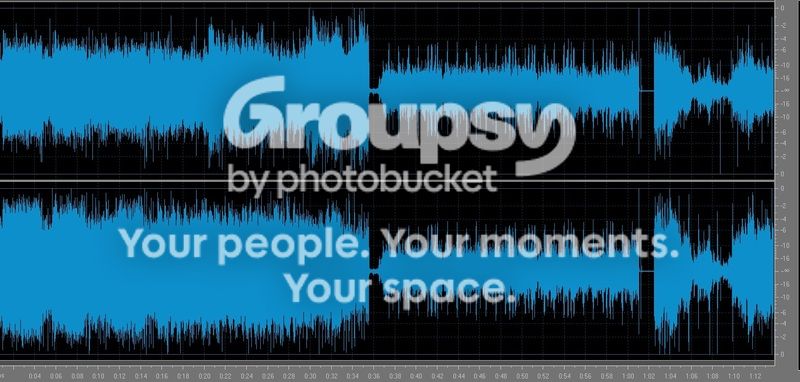
This is from a cranked up song on my car stereo. The first third of it is with the Samsung S4's mic. The second part is with the Bootlegmic plugged in. And the third is after I unplugged the mic, the song got to a quieter part. Looks like you need to click on the picture to see the db chart on the right side. Don't know why you cant see the whole picture.
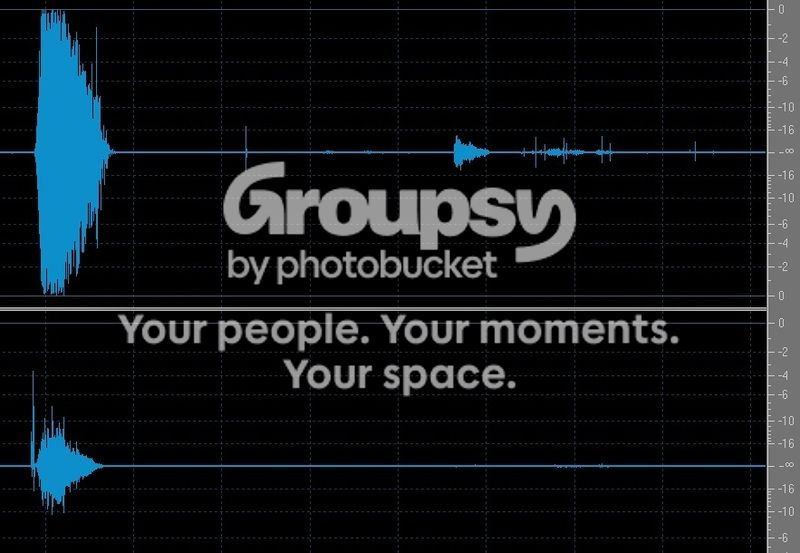
This second waveform is when I did the "ssshhhh" test. Once again my picture in this post does not show the db chart on the side. You have to click on the picture to see it.
Could you recommend a resistor/cap change that would give me more freq response while hopefully still cutting down on the distortion?
by guest » Mon Apr 20, 2015 17:12 UTC
can you post a spectrogram or FFT of the "sssshhhh" test? that will help figure out what to do about frequency response.
by iowabucks » Wed Apr 22, 2015 05:35 UTC
by guest » Wed Apr 22, 2015 18:39 UTC
i am having trouble reading the scale on the right-hand side (either that or it makes no sense to me). it looks like it goes from top to bottom:
2500
2000
1500
1000
5000
is that last one supposed to be 500.0? so the top frequency is 2.5kHz? if so, that is a incredibly sharp cutoff at 1.9kHz. the microphones that come with the kit go clear up to 30kHz or so.


