Thanks, clee!
Here's another effect I've been playing with lately. It's guest's pitch-shifter with a sequencer driving the pitch change. The pitch-sequence is stored inside the patch. You'll see have I have about 5 different ones in there; they're easy to change.
mod1 = sequencer speed
mod0 = general pitch range (same as guest's pitch-shifter!)
demo audio:
http://soundcloud.com/diydsp/spaceyloops-with-the
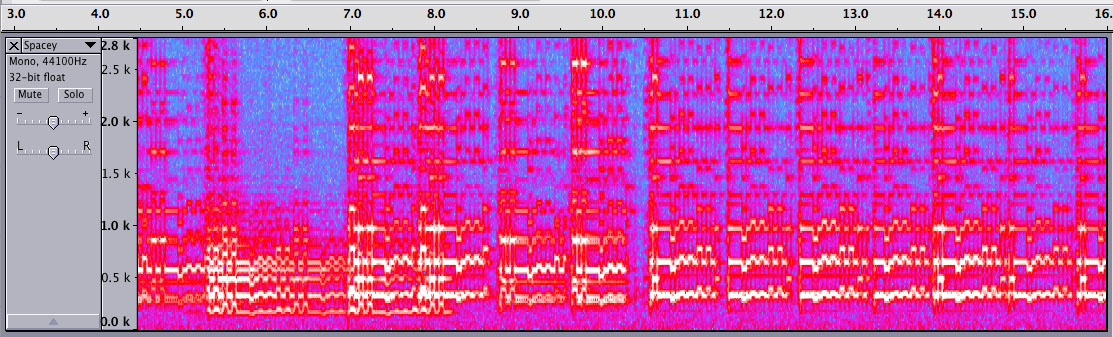
Spectral representation of the what the sequenced pitch-shifter does do a guitar signal
Note: this program was modified to include the sequencer at the Providence Maker Faire 2012 while at a booth next to a whole bunch of gameboy street performers who played inside with a portable amp. They were rocking the whole time, providing a great, inspiring atmosphere and taught me some of the nuances of the root-minor third-tonic sequence!
// ArpeggPitch02 -
// mod0 = overall pitch
// mod1 =
//based on Open Music Lab's GuestPitch01
/* Pitch Shifter loosely based on Open Music Lab's miCrODEC pitch shifter */
// -no interpolation between points yet
// -two taps move through the buffer at the same rate
// -tap amplitudes have triangle overlap windows
// -MOD1 controls amount of pitch shift

#define SAMPLE_RATE 44 // 44.1kHz sample rate
#define ADCS 2 // only 1 ADC used here -> MOD0
#include <AudioCodec_Maple.h>

// -MOD0 is divided into 21 regions that are each a different pitch multiplier
// -step size 320 is 1/1 ratio, 160 is 1/2 or octave-down
// -the step array represents a series of intervals that are from just intonation tuning
uint32 step[] = {120,135,150,160,180,200,225,
                 240,270,300,320,360,400,450,
                 480,540,600,640,720,800,900};
/*
uint32 step[39]={
  80,  85,  90,  95, 101, 107, 113, 120,
 127, 135, 143, 151, 160, 170, 180, 190,
 202, 214, 227, 240, 254, 269, 285, 302,
 320, 339, 360, 381, 404, 428, 453, 480,
 509, 539, 571, 605, 641, 679, 719
};
*/

int16 left_in, right_in, left_out, right_out;
uint16 mod0_value = 0,mod1_value=0;

#define SIZE 2048 // buffer size is limited by microcontroller SRAM size
int16 buffer[SIZE];
uint32 location = 0; // buffer location to read/write from
uint32 tap_count = 0;
uint32 tap0_pos,tap1_pos;
int32 tap0_amp,tap1_amp;
int16 pitch_shifted;

// arpeggiator code
// bigger numbers are slower
//uint16 countDownMax=5000;int16 sequence[] = {0,2,4,2,0,2,4,7};int16 sequenceLen = 8;
//uint16 countDownMax=1000;int16 sequence[] = {0,4,0,5};int16 sequenceLen = 4;

uint16 countDownMax=1000;int16 sequence[] = {5,5,5,2,2,2,0,0};int16 sequenceLen = 8;

//uint16 countDownMax=1000;int16 sequence[] = {1,0,1,0, 2,0,2,0, 4,0,4,0, 7,0,6,0};int16 sequenceLen = 16;


//uint16 countDownMax=1300;int16 sequence[] = {7,0,0,7, 0,0, 7,-1};int16 sequenceLen = 8;

uint16 countDownVal=100,sequenceStep=0;
int sequenceVal=0;


void setup() {
  SerialUSB.end();
  AudioCodec_init();
  //nvic_irq_disable(NVIC_USB_LP_CAN_RX0);
}

void loop() {  while (1);  }   // reduce clock jitter

// timer4_ch1 interrupt routine - all data processed here
void AudioCodec_interrupt() {
  AudioCodec_data(&left_in, &right_in, left_out, right_out);
  left_in = left_in * 8;   // scale input volume up by 18dB
  AudioCodec_ADC(&mod0_value,&mod1_value);

  // Arpeggiator Sequencer ------------------------
  countDownVal     = countDownVal - 1;
  if(countDownVal == 0){
    countDownVal   = countDownMax;

    // advance sequencer
    sequenceStep     = sequenceStep + 1;
    if(sequenceStep >= sequenceLen){
      sequenceStep   = 0;
    }

    // Mod1 controls speed of arpeggiation
    countDownMax = 10 + ( (0xffff^mod1_value) >> 4);
    sequenceVal  = sequence[sequenceStep];
  }


  // Pitch-Scaler ----------------------------------
  // Knob 0 selects pitch steps
  int n = 0;
  while (mod0_value > n) {
    n = n + 0x10000/21;      // 21 is the size of the step[] array
  }
  n = n*21/0x10000;

  n = n + sequenceVal;  // add arpeggiator's pitch sequencer value

  if (n > 20) {
    //n = 20;     // option 1. Peak at max pitch
    n = n - 7;    // option 2. Roll back one octave from target
  }

  tap_count = tap_count + step[n];
  int frac = tap_count%320;
  tap0_pos = (tap_count/320)%SIZE;
  tap1_pos = (tap0_pos + SIZE/2)%SIZE;

  // make the tap_amp's zero at the location and count up to SIZE on both sides
  // this for overlapping to hide the discontinuity the taps move across at the buffer's head location
  if (tap0_pos >= location) {
    if ((tap0_pos - location) <= SIZE/2) {
      tap0_amp = (tap0_pos - location);
    } else {
      tap0_amp = (SIZE - tap0_pos + location);
    }
  } else {
    if ((location - tap0_pos) <= SIZE/2) {
      tap0_amp = (location - tap0_pos);
    } else {
      tap0_amp = (SIZE - location + tap0_pos);
    }
  }
  tap1_amp = SIZE/2 - tap0_amp;

  pitch_shifted = (tap0_amp*buffer[tap0_pos] + tap0_amp*buffer[(tap0_pos+1)%SIZE]
                 + tap1_amp*buffer[tap1_pos] + tap1_amp*buffer[(tap1_pos+1)%SIZE])/SIZE/2;

  pitch_shifted *= 2;  // scale volume to hear a little more easily

  // bit crush
  //uint16 numberOfBits = mod1_value>>12;
  //uint16 mask = 0xffff<< numberOfBits;
  //pitch_shifted = pitch_shifted & (0x8000|mask);

  left_out = pitch_shifted;  // send wet val to left
  right_out = left_in;       // send dry val to right

  // store value for next time
  buffer[location++] = left_in;
  if (location >= SIZE)    location = 0;
}